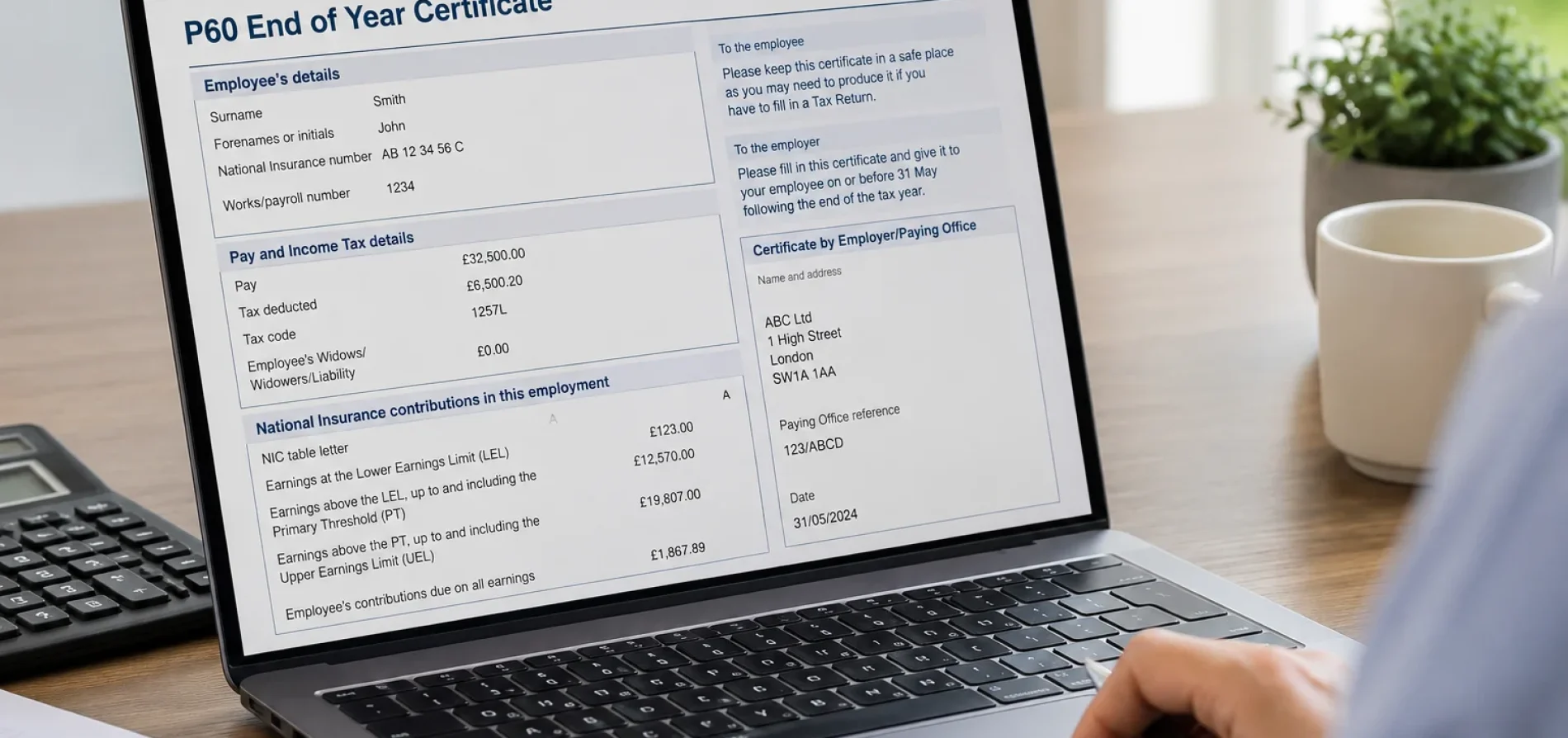
A P60 is an end-of-year tax document given to employees by their employer. It shows the total pay you received and the Income Tax deducted through PAYE during the tax year, and you may need it for tax returns, refunds, mortgage applications or proof of income.
A P60 may seem like a simple payroll document, but it can be very useful. You may need it to prove your income, check how much tax you paid, support a mortgage or finance application, complete tax paperwork, or claim back overpaid tax. GOV.UK specifically says you may need your P60 to prove how much tax you have paid on your salary.
For employees, company directors on PAYE, and people with more than one job, keeping your P60 safe can make future tax checks much easier.
What does a P60 show?
A P60 normally shows your total pay, Income Tax deducted, employer details and PAYE information for the tax year.
When do you get a P60?
If you are still employed at the end of the tax year, your employer should provide your P60 after the tax year ends.
What does a P60 show?
Your P60 gives you a summary of your pay and deductions for a particular job during the tax year. GOV.UK says a P60 shows the tax you have paid on your salary, while employer guidance says it summarises total pay and deductions for the year.
A P60 will usually include information such as:
- Your name
- Your National Insurance number
- Your employer’s details
- Your payroll or works number, where relevant
- Your taxable pay for the year
- The tax deducted through PAYE
- National Insurance details
- Statutory payments or student loan deductions, where relevant
It is important to remember that a P60 does not always tell the whole story of your tax position. For example, taxable benefits such as a company car or private medical insurance may be reported separately through a P11D, unless they are payrolled. GOV.UK lists P45, P60 and P11D forms as separate documents used for different employment tax records.
When do you get a P60?
You should receive a P60 after the end of the tax year if you were still employed by that employer on 5 April. The employer must give it to you by 31 May.
For example, if you were employed on 5 April 2026, your employer must provide your 2025/26 P60 by 31 May 2026.
If you left a job before 5 April, you would not normally receive a P60 from that employer for that tax year. Instead, you should usually receive a P45, which shows your pay and tax up to the date you left.
Who gets a P60?
P60s are for employees paid through PAYE. If you are on an employer’s payroll and still employed on the final day of the tax year, you should receive one.
You may receive a P60 if you are:
- A full-time or part-time employee
- A director receiving salary through PAYE
- An employee with more than one job
- A worker employed through an umbrella company
- Someone who is both employed and self-employed
If you are fully self-employed and have no PAYE employment income, you would not normally receive a P60. Your income would usually be reported through Self Assessment instead. GOV.UK’s Self Assessment employment guidance confirms that employment pages are used for PAYE employment and directorship income, not general self-employed income.
Do you get more than one P60 if you have more than one job?
Yes. If you have more than one job and you are still employed in each one on 5 April, you should receive a separate P60 from each employer. GOV.UK confirms that you get a separate P60 for each job every tax year.
This is important because each P60 only shows the pay and tax for that specific employment. If you are checking your total income for the year, preparing a tax return, applying for a mortgage, or checking whether your tax code was correct, you may need to add the figures from all your P60s together.
Multiple jobs can also make PAYE tax calculations more complicated, especially if one job uses your main Personal Allowance and another uses a different tax code.
Why is a P60 important?
A P60 is important because it gives you a clear annual record of pay and tax for a PAYE job. You may need it to:
- Prove your income
- Prove how much tax you paid
- Claim a tax refund
- Complete a Self Assessment tax return
- Apply for a mortgage or loan
- Check whether your tax code was correct
- Compare your payslips with HMRC’s records
- Confirm employment income for benefits or financial applications
GOV.UK says employees should keep documents about pay and tax, including P45s, P60s and P11Ds.
What should you check on your P60?
When you receive your P60, do not just file it away without looking at it. A quick check can help you spot payroll or tax issues early.
Start by checking:
- Your name
- Your National Insurance number
- Your employer’s details
- Your tax code
- Your taxable pay
- The tax deducted
- Any National Insurance or student loan information shown
If your tax code or pay figures do not look right, you can check your Income Tax details online. GOV.UK says the online Income Tax service lets you check your tax code, Personal Allowance, estimated income from jobs and pensions, and whether your tax code has changed.
You can also find your tax code on the HMRC app, your payslip, or a Tax Code Notice if HMRC has sent one.
What if there is a mistake on your P60?
If something on your P60 looks wrong, speak to your employer or payroll team first. This is usually the quickest way to correct the issue because the employer produced the P60 from payroll records.
If the employer needs to change a P60, GOV.UK says they should give the employee either a new P60 marked “replacement” or a letter confirming the change.
Do not ignore mistakes. Incorrect pay, tax, National Insurance or personal details can create problems later, especially if you need the figures for a tax return, mortgage application, refund claim, or HMRC review.
What should you do if you lose your P60?
If you lose your P60, ask your employer for a replacement. GOV.UK says this is the first step if you have lost your P60.
If you cannot get a replacement from your employer, you can use your Personal Tax Account or the HMRC app to find the information that would have appeared on your P60. You can also contact HMRC and ask for the information.
This means a lost P60 is inconvenient, but it is usually not a dead end.
Is a P60 the same as a P45?
No. A P60 and a P45 are different PAYE forms.
A P60 is given after the end of the tax year if you are still employed on 5 April. It summarises your pay and tax for that job during the tax year.
A P45 is given when you leave a job. It shows your pay and tax up to the date you left, and your new employer can use it to work out how much tax to deduct from your pay.
If you do not have a P45 when starting a new job, your employer may ask you to complete a Starter Checklist.
Can a P60 help with a tax refund?
Yes, a P60 can help when checking whether you have paid too much tax. GOV.UK says you may need your P60 to claim back overpaid tax.
However, a P60 does not automatically prove that you are due a refund. Whether you have overpaid depends on the wider picture, including your tax code, job changes, other income, pension income, taxable benefits, work expenses, and any tax reliefs that apply.
If you think you have overpaid tax, your P60 is a useful starting point, but it should be checked alongside your payslips, HMRC records and other income details.
Do self-employed people get a P60?
If you are fully self-employed and do not have PAYE employment income, you would not normally receive a P60. Instead, you usually report your income and expenses through Self Assessment.
If you are self-employed but also have a PAYE job, you may receive a P60 from your employer for the employment income. Your self-employed income would still be dealt with separately through your tax return.
If you are a limited company director and take a salary through PAYE, the company may need to run payroll and provide PAYE documents in the same way as other employers. GOV.UK provides guidance for company directors covering directors and PAYE, Income Tax, National Insurance and payroll reporting.
What is a Starter Checklist?
A Starter Checklist is a form used when someone starts a new job and does not have a recent P45, or where the employer needs additional starter information.
The Starter Checklist replaced the old P46 form. GOV.UK says employers use it to add a new starter to payroll, work out their tax code for the first pay, calculate how much tax to deduct, work out student or postgraduate loan deductions, and tell HMRC that the employee has started work.
The checklist may ask about things such as:
- Whether this is your first job
- Whether you have another job
- Whether you receive a pension
- Whether you have a student loan or postgraduate loan
It is important to complete the Starter Checklist accurately because the information can affect your first tax code and the tax deducted from your wages.
What happens with P60s and umbrella companies?
If you work through an umbrella company and are employed by that umbrella company, the umbrella company is usually the organisation responsible for running PAYE on your wages. That means your P60 would normally come from the umbrella company if you are still employed by them on 5 April.
HMRC warns umbrella company workers to check their payslips carefully and make sure the correct pay and deductions are being shown. GOV.UK says workers should check details such as hourly rate, hours worked, gross pay, net pay and deductions.
If you work through an umbrella company and something on your P60 does not match your payslips, you should raise it with the umbrella company’s payroll team.
What do employers need to know about P60s?
Employers must give a P60 to every employee who is on their payroll and working for them on the last day of the tax year, which is 5 April. The P60 must be provided by 31 May.
Employers can usually produce P60s through payroll software. GOV.UK says employers must give employees a P60 at the end of each tax year and a P45 when they stop working for the employer.
If a P60 needs correcting, the employer should issue either a replacement P60 or a letter confirming the change.
For small limited companies, this also matters where directors are paid through PAYE. If the company runs payroll and the director is on payroll at the end of the tax year, the company should make sure the correct PAYE year-end process is followed.
How long should you keep a P60?
It is sensible to keep your P60s with your tax and employment records. GOV.UK says employees and limited company directors should keep documents about their pay and tax, including P45s, P60s and P11Ds.
Keeping old P60s can help if you later need to check employment history, prove income, complete a tax return, apply for finance, or answer HMRC questions.